
Bidinet the smart supply network
From electrical goods to materials, HVAC and equipment: send your purchase need as one sealed tender, collect supplier proposals, and compare price and terms before you choose.
For Android and iOS

Your office, in your pocket
At your desk, on site or on the road: follow your business's tenders and proposals from your phone. Bidinet brings you closer to the next opportunity.
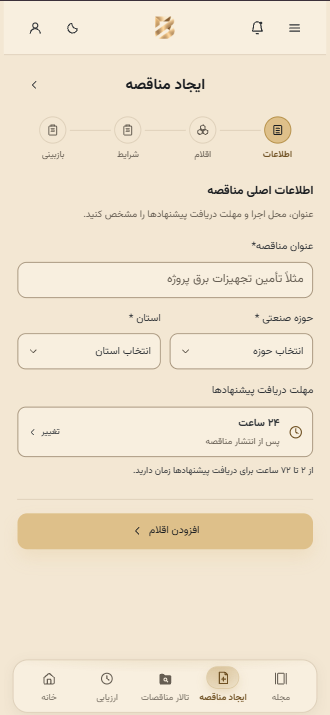
Step one: describe your need precisely
Set a title, industry and project location; then add the items and terms in the next steps
Real app screenshots; contractor view in light mode, supplier view in dark mode
Two sides of one deal, one simple path
Whether you're buying for a project or have products to offer, Bidinet puts the path to a deal right in front of you.
From item list to choosing a supplier
Post your project's needs once. See supplier proposals side by side and decide by comparing price and terms.
See this path in the app- 01
Create a tender
Post your project's item list and terms
- 02
Receive proposals
Collect supplier proposals in one place
- 03
Evaluate proposals
Compare the price, specs and terms of each proposal
- 04
Choose & deal
Pick the right supplier for your project
Every proposal, a clear decision
A tender is created, a proposal arrives in an envelope, and the price is reviewed. See how a quoted price compares with the budget in this demo.
This demo only illustrates price comparison; product quality, delivery terms and the details of each proposal also matter in your choice.
Needs vary, the path to supply is one
Bidinet isn't only for building materials. Post a tender or send your proposal for goods and equipment in any of these fields.
- Electrical & electronics
- Building & civil materials
- Steel, ironwork & metal sections
- Mechanical installations & HVAC
- Security & surveillance systems
- Pipes, fittings & valves
- Safety & firefighting equipment
- Doors, windows & building hardware
- Building finishes & interior decoration
From listing items to comparing proposals: one shared path for very different purchases
Focus on the project, supply with peace of mind
Tools for better decisions, clearer communication and simpler buying.
- Your whole item list, one place
- Every project need in a single, clear request
- Lower purchase cost
- Compare prices before the final decision
- A wide supplier network
- A way to find the right partner for your project
- Speed and ease
- Track tenders and proposals from your phone
- Security and transparency
- See the specs and terms of every proposal clearly
You may be wondering
Get to know Bidinet a little better.
Question not answered here? Call Bidinet support.
0919 579 1098Bidinet is an app that connects contractors and suppliers. A contractor posts a project's purchase need as a tender, and suppliers respond with their price and terms.
In the app, choose the contractor role, enter your item list and project terms, and once proposals arrive, compare them to choose a supplier.
You can browse relevant tenders, send your price and supply terms, and reach out to contractors and new customers to work together.
Bidinet is available for Android and iOS phones. Use any Get the app button on this page to open it.
The envelope has landed. Your next partnership starts with Bidinet
One app for building new working relationships. Keep Bidinet on your phone.
The app opens in your browser, and you can add it to your phone's home screen.